
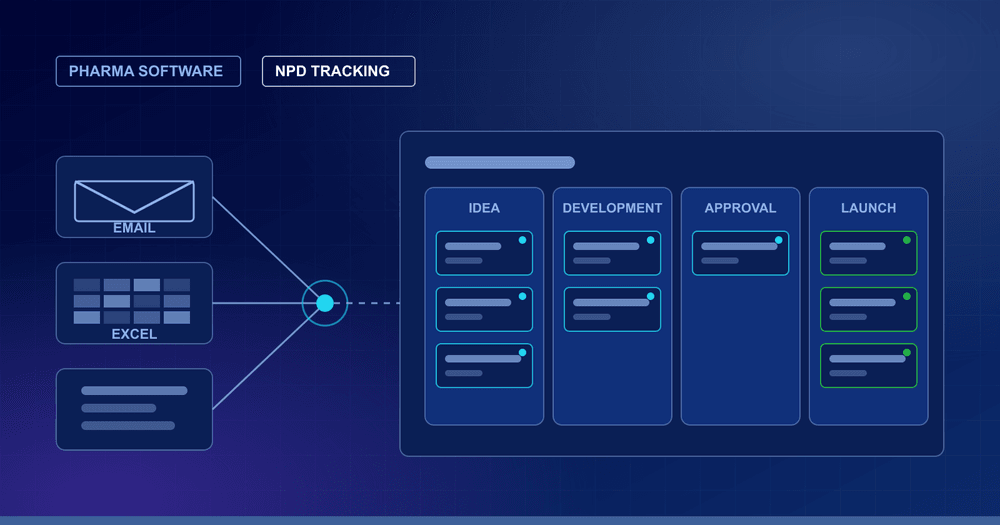
In most pharma companies, the question “where is this product right now?” is answered by an email thread, a shared Excel file, or a person. New product development (NPD) involves many teams, including R&D, regulatory affairs, business development and commercial, so the status of each product is scattered across inboxes and spreadsheets. This article explains why that breaks down, what NPD tracking software does differently, and what to look for before you build or buy.
1) Why email and Excel stop working for NPD
Email and spreadsheets are fine for a handful of products. As the pipeline grows, the same problems appear again and again:
- Several versions of the truth: each team keeps its own tracker, and no two agree on the current stage.
- Status by chasing: someone has to ask every team for updates before each review meeting.
- No clear owner or history: it is hard to see who approved what, and when a stage changed.
- Manual reporting: management reports are rebuilt by hand from the trackers, so they are late and easy to get wrong.
- Risk of loss: knowledge sits in individual inboxes and personal files, and leaves when people do.
2) What NPD tracking software does
NPD tracking software replaces the status-update emails and scattered trackers with one system. Every product’s current stage is visible on a single board, so nobody has to ask. In practice it gives you:
- One board for the whole pipeline: every product and its current stage in one view.
- Stages, approvals and sign-offs built in: the workflow follows how your company actually works, with a clear record of each approval.
- Role-based views: Business Development, Regulatory Affairs, R&D, Commercial and senior management each open the view that is relevant to them.
- Automated reports: status summaries are produced from the live data instead of being rebuilt by hand.
Quick win: before choosing any software, list your current stages and who signs off at each one. If your team cannot agree on this list, no tool will fix the tracking until it is settled.
3) What a good NPD board shows
A useful NPD board answers the questions people normally ask by email, without anyone having to reply:
- Which stage is each product in right now?
- Who owns the current stage, and which approval or sign-off is it waiting for?
- What has changed since the last review meeting?
- Which products are waiting on another team?
- What does management need to see in the next review?
Example: a product waiting for a regulatory sign-off shows that status on the board. The review meeting then starts from the same screen for everyone, instead of from a round of status emails.
4) Generic template or custom-built?
Off-the-shelf project tools use their own stages and terminology. Pharma teams often have a specific stage-gate process, their own approvals, and their own product and molecule naming. Forcing that into a generic template usually leads to people keeping Excel on the side again.
Custom NPD software works the other way round: it is configured to your existing workflow and stage-gate process, not the other way around. That is the approach Kelectron takes with its NPD tracking and automation software. We build the tracker around your own stages, approvals and sign-offs, in your terminology.
5) Connecting NPD with the rest of your pharma data
NPD decisions rarely depend on one source. The same teams also look at regulatory approvals, patents and market data. When NPD tracking sits alongside these in one system, decisions are easier to support. For example:
- Patents: understanding what a patent actually protects, not just when it expires, so freedom-to-operate and NPD calls are made on claim scope rather than headline dates.
- Regulatory approvals: approval dashboards for authorities such as USFDA, Health Canada, the EU and Japan, next to your own product stages.
- Sales data: automated IQVIA or Symphony reporting, so market data does not have to be cleaned by hand.
- Your own systems: where needed, the same views can connect to your ERP, PLM or BI systems.
6) Common pitfalls when moving off Excel
- Copying the Excel sheet as it is: moving every column across carries the old clutter with it. Keep the fields people actually use to take decisions.
- Using stage names the team does not recognise: if the board uses different words from the ones people use every day, they go back to email.
- No named owner: every product needs one person responsible for keeping its stage up to date.
- Running both systems side by side for too long: two sources of truth bring the original problem back.
- Building every report on day one: start with the board, and add reports once the team trusts the data.
7) Checklist: what to look for in NPD tracking software
- Can it follow your own stages, approvals and sign-offs, without forcing a generic template?
- Does every product’s current stage show on one board that anyone can open?
- Does it keep a history of who approved what, and when?
- Do different departments get role-based views of the same data?
- Can it produce management reports without manual rework?
- Can it connect to your ERP, PLM or BI tools if you need that later?
- Who owns the data, and can the system be hosted the way your IT and compliance teams require?
8) How to start without disrupting the team
- Map the current process: write down the stages, owners and approvals as they work today, including the Excel files people really use.
- Start with one board: get every active product onto a single view first. Add reports and integrations afterwards.
- Retire the old trackers: agree a date after which email and Excel are no longer the source of truth, otherwise both systems run in parallel.
Talk to us about your NPD workflow
Kelectron builds custom pharma software and tools for pharma data, including NPD tracking and automation, regulatory dashboards, patent claims mapping and IQVIA automation, around your own terminology and workflow. If you are still using status emails and Excel trackers for your pipeline, describe your process to us and we will tell you what a single board could look like for your team. See our Pharma Intelligence service or contact us.
Common questions
What is NPD tracking software?
It is software that shows every new product’s current stage on a single board, with the approvals and sign-offs behind it, so teams no longer rely on status-update emails and scattered Excel trackers. Kelectron builds it as custom software around your own stages and terminology.
Why is Excel not enough for NPD tracking?
Excel works for a handful of products. As the pipeline grows, each team keeps its own version, status has to be chased by email, there is no clear history of who approved what, and management reports are rebuilt by hand. A single board removes these problems.
Can NPD tracking software follow our own stages and approvals?
Yes. Custom NPD software is built around your company’s own stages, approvals and sign-offs rather than a generic template, so management sees where every product stands on a single board without chasing teams for updates.
Can NPD tracking connect to our ERP, PLM or BI systems?
Where needed, the same intelligence can be connected directly into your ERP, PLM or BI systems, alongside role-based dashboards so each department opens the view that is relevant to them.